Terraria : All Characters Lost? Here’s Why It Happens & How To Fix It



Most Terraria players experience the frustration of losing a world at least once while playing Terraria. It’s truly infuriating when you lose the progress that you have invested 100+ hours in. It can happen due to a variety of reasons, but once it’s done, the only thing we’re interested in is how to fix it. Let’s see why character (and world) loss happens in Terraria and how do you fix it.
Why did my Terraria world get corrupted?
Most commonly, save corruption happens when the game’s saving process is in any way interrupted. That can happen for a variety of reasons, but most commonly, it’s going to happen if you’re game crashes in the middle of saving or if there’s a sudden power outage and your device gets turned off in the middle of playing. Corruption happens as well if you force-close your game while it’s saving or if you’re using cloud-saving mechanisms. Those tend to corrupt files as well.
Mods are also a part of the problem, as modding the game with unreliable content can lead to unforeseen consequences that can result in your world/characters being completely unusable.
Rarely do the players delete worlds & characters by accident. There’s really nothing you can do about this except be extra careful when you’re handling game files.
How do you recover a lost character in Terraria?
There are a few ways to restore your lost characters in Terraria but it’s important to note that they might not always work. Even when they do work, you might lose a significant chunk of your progress. In a way, prevention is a better course of action than simply dealing with the problem when it arises. Let’s see how to recover lost characters in Terraria.
Revert to a previous version of a save file
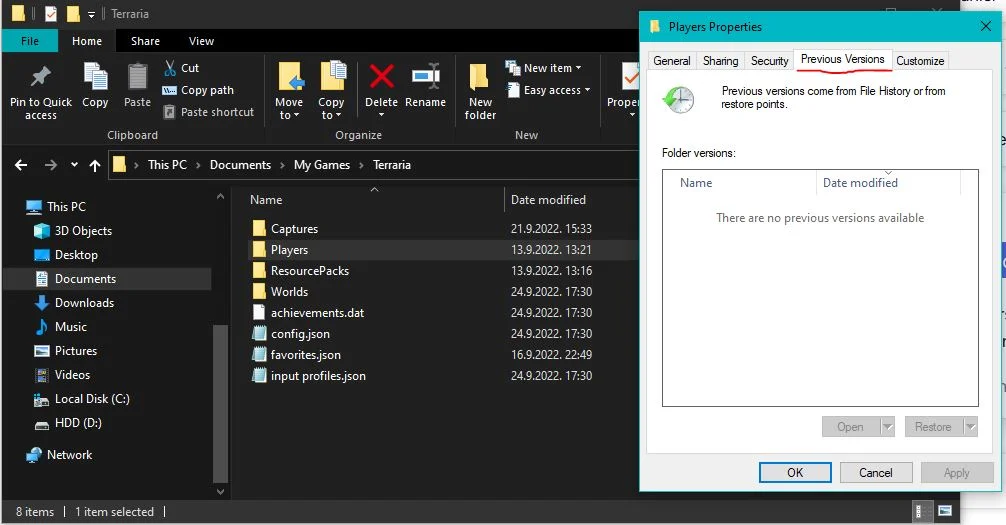
The most common way to deal with lost characters is to try to restore an earlier version of your save file before it got corrupted. To do that, follow these steps.
- Navigate to My Documents/My Games/Terraria
- Once you’re in the Terraria folder, select “Worlds” or “Players” folders, depending on what exactly got corrupted
- Right-click on the file and select properties
- Once inside the properties tab, select “Previous versions”
- If you have restore points enabled you should see previous versions of this file available, if you have them off like me, you’re out of luck and you should move on to the next solution.
If you do manage to restore your save file to the earlier version, don’t be surprised if a significant chunk of your progress is lost.
Try to recover your files by renaming .bak files
Another way to approach this problem is to try and locate your old .bak files and simply change their extensions, depending on what got corrupted. To do that, follow these steps.
- Once again, navigate to My Documents/My Games/Terraria
- If your world got corrupted, go to the “Worlds” folder, and if your character got corrupted, go to the “Players” folder
- Check to see if there is an older .bak file inside
- Change the extension of .bak file from .bak into .wld (if your world got corrupted) or .plr (If your character got corrupted)
- If you can’t see your file extension, go to “view” and enable file name extensions
- Launch the game
Once again if this solution worked and you see that you have lost a lot of progress don’t be surprised, it’s normal.
Check your Steam Data folder
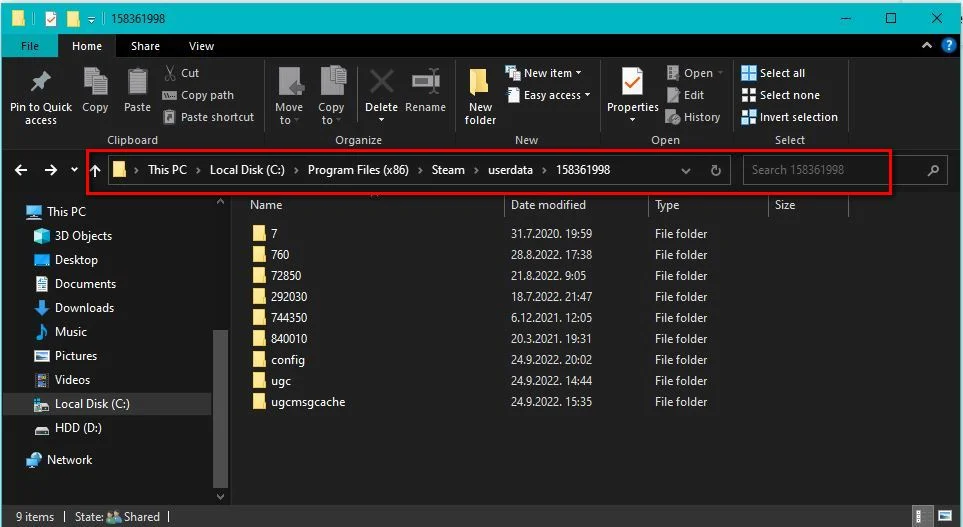
We’ve already mentioned that Steam Cloud saving can sometimes be the cause of problems with your save files, but it can be a solution as well. Sometimes, you can pull your saves from the Steam cloud and replace the corrupted versions on your local machine. To do that follow these steps
- Navigate to the Steam folder. It should follow a path like this: C:\Program Files (x86)\Steam\userdata
- Enter your account’s folder. It should be a random string of numbers it’s different for each person
- Search all folders for something to salvage. Chances are you will find at least one older version of your save file
How to prevent corrupted save files?
You can avoid most of the problems related to Terraria save files by not interrupting saving while it’s in progress. While that does not guarantee that your world or character will not get corrupted in the future, it minimizes the chances of that happening. Here’s what you can do to prevent corrupted Terraria save files:
- Do not leave your game while your progress is saving
- Don’t turn off your PC while your progress is saving
- turn off the auto-saving feature and only use manual saving
- Turn off Steam Cloud saving
- Create a backup of your save file after every session
- Avoid suspicious mods
And that would be all. Following these tips does not guarantee that you will not lose any worlds or characters in the long run, but it creates a safety net if something does happen. Even if a major loss never happened to you it’s still a good idea to back up your save files every once in a while.
Have something to add? Let us know in the comments below!