The Best 5 Real-Time Voice Changers for Discord


Honestly, I never understood the hype of Discord a few years ago, especially when its popularity was at its peak during and post COVID. It sounded like a trend. What does it do that most messaging platforms don’t? I mean, it’s a genuine question, right?
I then had to use it—destiny! And later discovered its voice features and how people use the voice feature and Discord as a whole.
And now I know why Discord is the king in its own right and how people have fun on it.
If you found your friends or someone changing their voice or adopting a whole different persona on Discord, and you’re wondering how to do that?
Believe me, I will answer all your burning questions today because I was you once! And not just that, I will also be recommending the best voice charger for Discord that’s available in the market!
Having a great voice changer is vital because the mediocre ones don’t have a “soul” or “feel” in them, though they might offer a million-plus voices. But the quality ones? Even if they’re offering just 10 voices, they’ll feel so real!
Now that all said, let’s find you the best voice changer for Discord? Let’s go then!
Why Change Your Voice on Discord?
Here’s why someone would use a voice changer for Discord aside from the apparent reason you’re here for. It’s best to showcase multiple use cases before we proceed ahead, right?
People may use a voice changer for Discord not just for trolling and fun but also for character immersion. For example, gamers may use voice changers to sound like the game character in their favorite roleplay servers like GTA RP, D&D, Among Us, etc.
Aside from that, someone might also use a voice changer on Discord to protect their identity and to keep themselves anonymous or perhaps to not let the other party know their gender.
One may also use a voice changer for Discord if they’re a streamer, a YouTuber, a podcaster, or a content creator. They may use it for skits, narration, or character voices.
I mean, the applications are endless but those are some of the use cases.
Top 5 Real-Time Voice Changers for Discord
Top 1. EaseUS VoiceWave

Price: Free plan available | Paid subscription for more features.
I’m coming with no bias or partiality, but my god! EaseUS VoiceWave is one heck of a tool! It’s one of the best out there currently. Honestly, don’t trust me yet! Once you hear what all this has and delivers, you’ll sing the same praises as well.
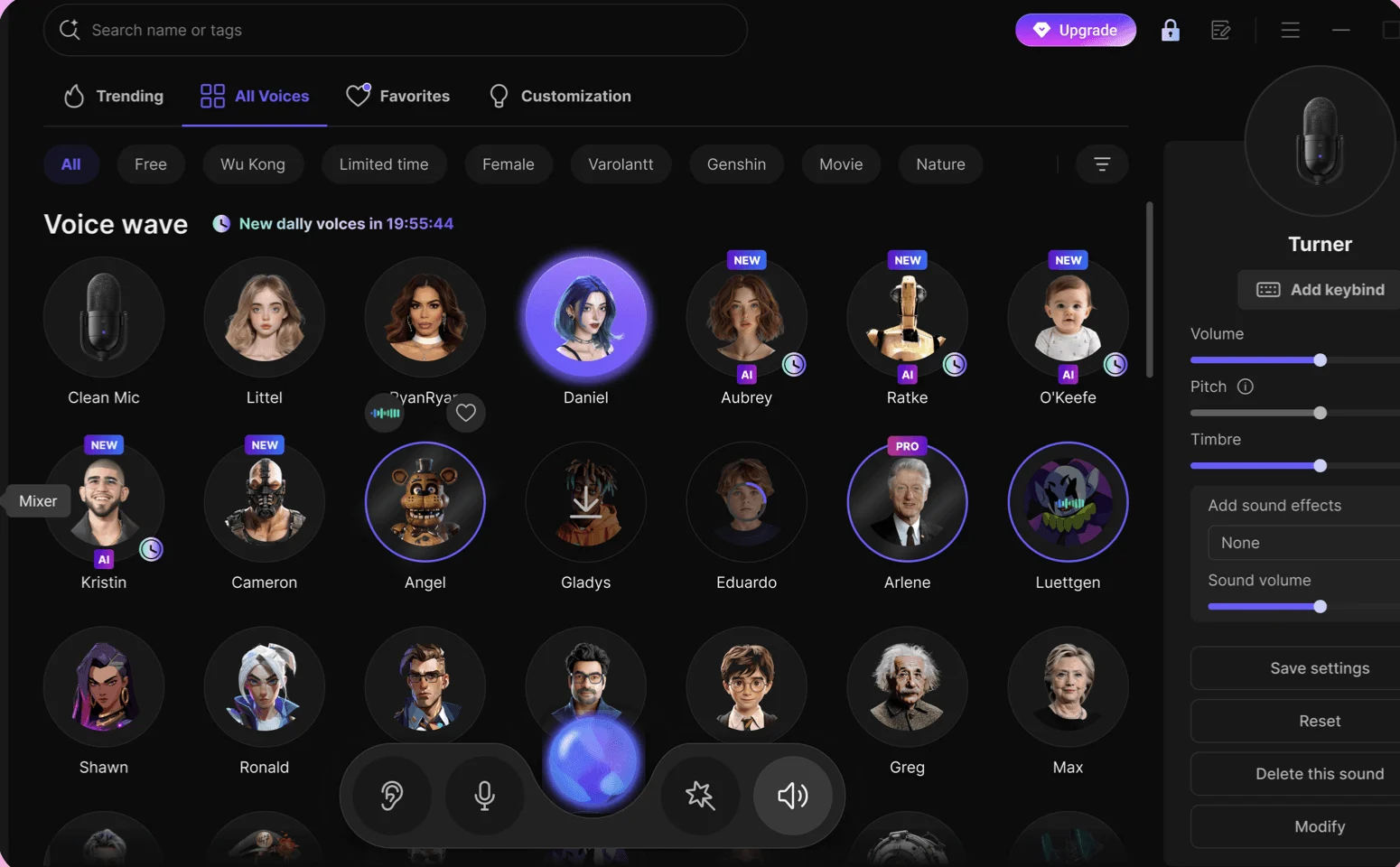
The EaseUS VoiceWave offers over 200 voices, 300+ soundboard effects, support for over 1000 instant messaging apps, and support for over 1000 online games as well. I mean, wow!
If you thought this was the end of it, think again. Aside from that, you get useful features like “Noise Reducer” and “Audio Mixer.”
Now for the best part about EaseUS VoiceWave. Its voice library is extremely high-quality. To enhance your experience even further, you can use a soundboard with over 300 professional sound presets ranging from robotic tones to cinematic FX.
EaseUS VoiceWave also includes “Popular Effects” with 100+ presets such as Anime Girl, Ghostface, and AI News Anchor.
I mean, there’s plenty more that I could go on about indefinitely, but I don’t want to take all your day because, believe me, you’re going to spend hours exploring this tool and loving it. And, without a doubt, this is the best tool available.
Key Features:
- Over 200 voice effects and 300 soundboard presets.
- Works with more than 1000 apps and online games.
- The built-in noise reducer and audio mixer make the sound clear.
- Anime Girl, Ghostface, and AI News Anchor are some of the best voice filters.
Pros:
- A huge library of high-quality voices.
- Works perfectly with games, streaming, and chat apps.
- The interface is easy to use, making it great for both beginners and experts.
Cons:
- You have to pay for a subscription to get advanced features.
Top 2. NCH Voxal Voice Changer

Price: Free plan available | Paid subscription for more features.
NCH Voxal Voice Changer stands out as a powerful voice modulation tool featuring an extensive collection of high-quality voice effects and filters. What sets this software apart is its real-time processing capability, enabling instant voice transformation – perfect for Discord conversations or immersive gaming sessions where you can instantly adopt Venom’s iconic voice.
Key Features:
- Its specialized voice filters can expertly recreate the vocal effect
- The software offers multiple filter options to achieve different voice.
- User-friendly interface makes voice customization simple and immediate With these advanced features.
- Free to use, donationware model.
Pros:
- Audio control that can be changed a lot.
- Good for streamers and people who need professional-level sound routing.
- Lightweight and stable on Windows.
Cons:
- Very costly
Top 3. AV Voice Changer

Price: free for casual use, paid for professional/commercial use.
AV Voice Changer has established itself as a leading voice modification tool in the industry. While originally developed for Skype integration, this versatile software has evolved into a comprehensive solution for voice transformation, including the ability to emulate Venom’s distinctive vocal characteristics.
Key Features:
- Extensive voice filter library with gender transformation capabilities (male-to-female and vice versa)
- Advanced customization options for creating unique voice profiles
- Real-time voice processing for instant effects
- Intuitive interface designed for users of all experience levels
Pros:
- User-friendly interface ideal for beginners
- Broad compatibility with various applications
- Deep customization potential
- Reliable real-time processing
Cons:
- Premium pricing structure
- Requires some technical understanding for advanced features
Top 4. Voxal Voice Changer

Price: free for casual use, paid for professional/commercial use.
Voxal Voice Changer is another great tool to change your voice for Discord. But here’s the thing, it doesn’t have a large voice library. In fact, it only offers you “voice effects” in the name of “voice changer.”
The equalizer can adjust volume, pitch, bass, frequency, and output in mono or stereo.
If you want to have fun on Discord, Voxal Voice Changer could be just the thing. It can also be useful if you want to create a tutorial or publish a video on the internet while remaining anonymous.
Key Features:
- Voice effects that happen in real time and can be changed in pitch, bass, and frequency.
- It works with most apps, like Discord, Skype, and games.
- Supports sound effects in the background to make the experience more real.
- It runs in low CPU mode, so it won’t slow down games.
Pros:
- Lightweight and easy to set up.
- Works with a lot of apps and games.
- Changes can be made in real time during calls and streams.
Cons:
- There are fewer preset voices in the library.
- The free version can only be used for personal use.
Top 5. Clownfish Voice Changer

The Clownfish voice changer was actually created for Skype initially, but its support has since been extended to other platforms and games as well.
Unlike EaseUS VoiceWave, Clownfish is not a mind-blowing tool, but it is a good one with a large voice library and voice effects.
So, if you want a tool that is simple, lightweight, and functional, Clownfish should be your first choice.
Key Features:
- Installation across the whole system—once it’s turned on, it works on all apps.
- Includes well-known voices like male-to-female, alien, and robot.
- Text-to-speech and translation features are built in.
- The interface is light and easy to use.
Pros:
- Completely free to use.
- Uses few resources, so it won’t slow down your PC.
- It works on the whole system, not just Discord.
- Simple to set up and use.
Cons:
- Not as many ways to customize as premium tools.
- The interface looks old.
How to Change Voice on Discord
So, you’ve picked a voice changer for Discord—now what? Don’t worry, setting it up is much easier than it looks. Here’s a simple step-by-step guide you can follow to start sounding like a robot, an anime character, or even a ghost in real time.
- Install and Open Your Voice Changer
- Open Discord Settings by clicking on the cog icon in the bottom left side next to your username.

- Under “App Settings,” select “Voice & Video.”

- Now, under the “Input Device” dropdown, select the virtual microphone from your voice changer, e.g., EaseUS VoiceWave, Clownfish Voice Changer, and others.

- The “Output Device” should be set to your speakers or headphones.
- Scroll down to “Mic Test” and click “Let’s Check.”
- Speak into your mic and you should now hear your changed voice. Adjust pitch, effects, or volume in your voice changer until you’re happy.
- Head back to Discord, join any voice channel, or start a private call with a friend. Your new voice will now be applied in real time!
The Concluding Thoughts
Changing your voice on Discord isn’t just a trick; it’s a way to make your chats more fun, creative, and even private.
The right voice changer for Discord can make a big difference in your experience, whether you’re role-playing in a game, protecting your identity, or making content.
There are tools with a lot of features, like EaseUS VoiceWave, and simple, light apps, like Clownfish.
You’ll be able to sound like anyone or anything you want in just a few easy steps. Give one a try and see how much more fun your Discord sessions are.
FAQs on Real-Time Voice Changers for Discord
1. How do real-time voice changers work with Discord?
They create a virtual microphone on your computer. When you select this mic in Discord settings, your live voice is routed through the voice changer before others hear it.
2. How do I set up a real-time voice changer for Discord?
Install the app, open Discord, and then open “User Settings,” followed by “Voice & Video,” and then set “Input Device” to your voice changer’s virtual mic. Then test your mic to confirm it works.
3. Can I preview my voice with the filter before going live?
Yes. Most tools like EaseUS VoiceWave, VoiceMeeter, or Voxal allow you to preview effects inside the app before you join a Discord call.
4. What are some common troubleshooting tips if my voice changer isn’t working?
- Check that the correct virtual mic is selected in Discord.
- Restart both Discord and the voice changer app.
- Turn off Discord’s Noise Suppression if voices sound distorted.
- Make sure no other app (Zoom, OBS, etc.) is blocking the virtual mic.