Minecraft: You Can’t Dye Wood, But Here Are the Alternatives

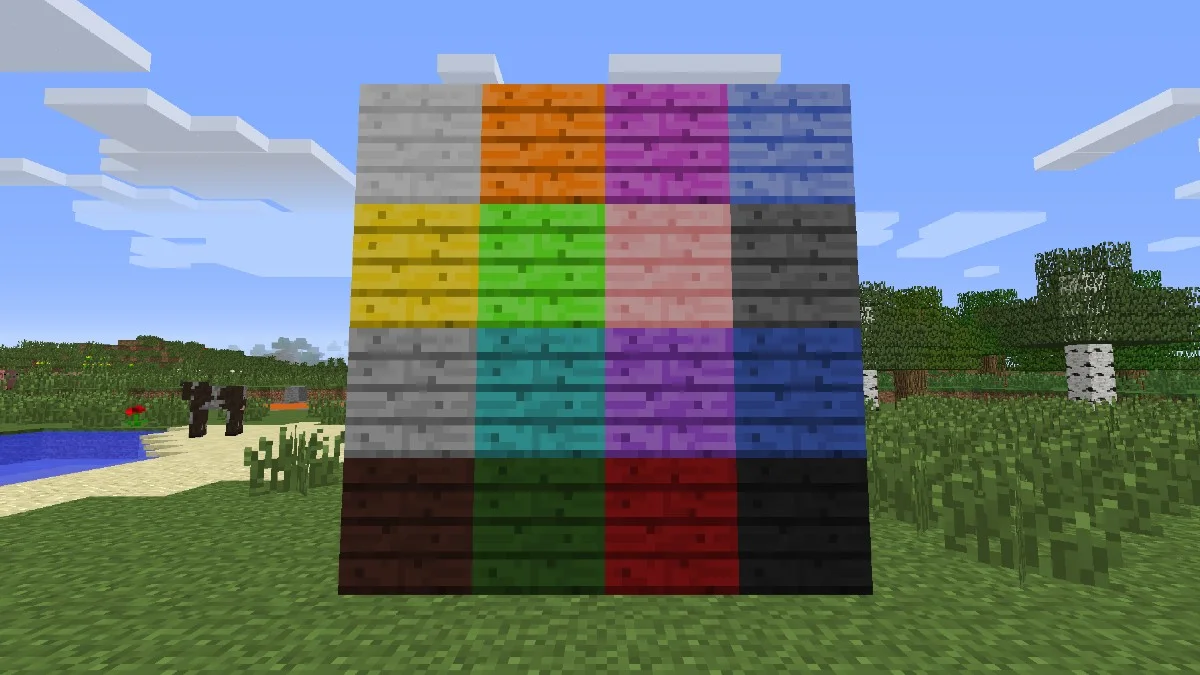

Wood is probably the most helpful resource to acquire in Minecraft whenever you’re starting a new world. It helps you create your first pickaxe, sword, crafting table, and bed. Once you’ve progressed a bit, the fun can start, and it’s time to build your fully customized home. We all want our homes to be unique; one way to approach it is by using different colored items. There seem to be almost limitless items you can dye, but what about wood? Can you dye wood in Minecraft?
Items you can dye in Minecraft
The list of items you can dye is extensive, so you won’t be seeing the full list, but you’ll get details on how you can dye these items.
Concrete Powder
it’s a physics-obeying block and you can dye it 16 different colors. Although the blocks are visually identical, the main difference between the two is that sand can’t be dyed. You’ll make it by placing 4 sand, 4 gravel, and 1 dye of your choosing into your crafting table
Firework Star
A firework star will determine the color, effect, and shape of a firework rocket. If you use a dye, the rocket will portray that color. To craft the star, you’ll need gunpowder and dye.
Leather Armor
It’s the weakest type of armor you can obtain by killing animals such as cows. To dye leather, you’ll need to craft a cauldron, place the dye and water into it and then dip the leather armor into it.
Wool
You can choose to permanently dye a sheep one color so that it’ll always shear that wool color, or you can dye the wool. To dye wool, you can place dye and wool block; their position doesn’t matter. To dye a sheep, you can right-click it with your dye in hand.
Stained Glass
To make stained glass, you need to place 8 blocks of glass in the crafting table and then place the dye in the center. From stained glass, you can create stained glass panes.
Terracotta
To craft stained clay, you’ll need to position 8 blocks on the crafting table and add dye to the center
Banners
You can’t dye banners. Instead, you need to dye the wool that will be used to make them. To make a banner, place 6 wool on the crafting table and one stick in the center on the bottom.
Shulker Box
To dye a Shulker box, you’ll simply place the Shulker box and any type of dye below it. You can un-dye the box using a cauldron
Types of dyes
Minecraft recognizes 16 types of dye. They can be crafted, dropped, or smelted depending on the dye. These dyes are:
- White (Bonemeal) – craft it from bones
- Black (Ink) – upon killing a squid, they’ll drop an ink sack
- Brown (Cocoa) – It is dropped from cocoa pods
- Red (Rose) – you can craft them from poppies
- Green (Cactus) – you’ll get it by smelting cacti
- Blue (Lapis Lazuli) – it’ll drop from a Lapis Lazuli ore or craft it from cornflowers
- Yellow (Dandelion) – you can craft it from dandelions
- Gray – you can craft it from ink sacs + bonemeal
- Light Gray – you can craft it from gray dye + bonemeal or with oxeye daisies
- Orange – you can craft it from red + yellow or orange tulips
- Lime – you craft it from green + bonemeal
- Light Blue – craft it from Lapis Lazuli + bonemeal or from flowers
- Cyan – craft it from green + lapis lazuli
- Pink – craft it from red + bonemeal or flowers
- Purple – craft it from red + Lapis Lazuli
- Magenta – craft it from purple + pink dye or lilac

Installing mods and add-ons
In Bedrock Edition, you will mostly use add-ons to customize your game experience. These add-ons cost money, while In Java Edition, you’ll use mods that you search for, and they mostly don’t cost anything.
Java Edition Users – you first need to have Java installed, and after, download the version of Minecraft Forge that matches the server version. To install Forge, you’ll need to click on the .jar file. Then, you can scout the internet to find the mods and download them. You can then place the mod in your mods folder. In App Data –>Roaming –> .minecraft you’ll find the folder. If it is not there, you can make the folder yourself
Bedrock Edition Users – You can get them directly from the marketplace. A Realms Plus subscription gives you a few free ones, but other than that, you need to pay for them.
Mods containing the Dye Wood feature
Go to CurseForge and click on Browse. Select Minecraft, and in the Search Modpacks bar, type in ”Dye Wood”. You’ll get at least 4 mods containing the feature. If the search doesn’t come up with anything, go back to Google and type in ”Curseforge Minecraft Mods”, enter the site through Google and repeat the process.
The Modpacks you’ll find there are: Colored Wood by tylerperytheplatypus, Dyeable Woods by SDragon1, and Dyable Planks by LBM0915.
Another popular website for finding mods is Minecraft Mods where you can find a mod by the name of Gwycraft. It will add color and glowing capability to many blocks. Another cool feature is that it adds enchanted ores that will allow you to dye almost every building block, including wood.
Have something to add? Let us know in the comments below!